What is CREN?
Archodia CREN stands for: Credit, Revenue, and Earnings Note.
When and how do I get a CREN?
Overpaid Invoice
When you overpay your invoice, we will issue a CREN (Credit Note) that shows the amount returned.
As an Artist
You receive your Archodia Music streaming revenue as a CREN, which in this case is a Revenue Note. More Artists' Streaming Revenue details can be found here.
Archodia Member
You automatically become an Archodia Member when you purchase any of our services or products. As a member, you earn a yearly rebate on your Archodia purchases, which in this case is an Earnings Note.
The rebates are calculated yearly based on Archodia's income surplus. This means your purchase becomes an investment, and the surplus not needed to develop our operations is returned to you as a rebate, in the same way as a dividend to shareholders in a profit-sharing company. The more services you purchase, the more rebates you tend to get at the end of the year.
Rebates are a way of us saying thank you for being a part of our mission with your purchases. All unclaimed rebates are donated to any charity of your choice as a member via a poll.
Can I view my CREN balance?
You can view your CREN balance via your Archodia portal account by;
- Logging in to your account here: https://my.archodia.com/authentication/login
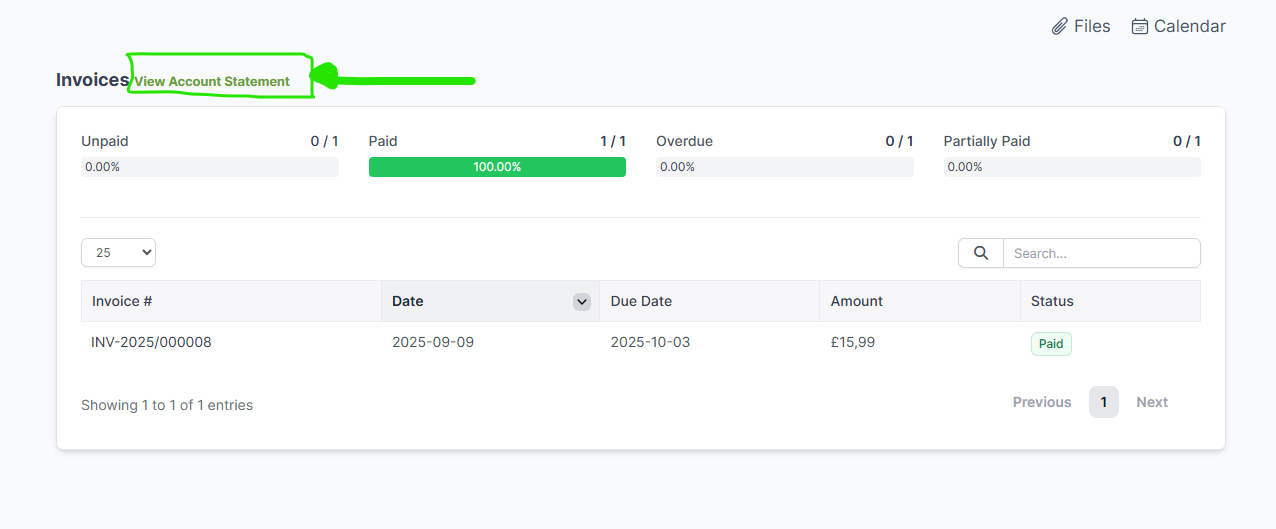
- Click on the "Invoices" menu
- Select "View Account Statement"
- The current month is set by default. You can choose the timerange you want to see

Your CREN balance is negative (-) by default. This only means that you are yet to spend your CREN.
How to use my CREN:
Use your CREN by;
- Shopping at Archodia
- Applying it to your next invoice when making a payment. Does not apply to subscriptions.
- Request a Payout
Log in to the Partner Portal account to get in touch for assistance.
Still need help? Please get in touch with us here, and we will respond shortly.